Export onboarding data
You can export the onboarding data available on the Dashboard, either from your Dashboard or with the API. Review the next steps to understand what happens after finalizing your export.
Dashboard
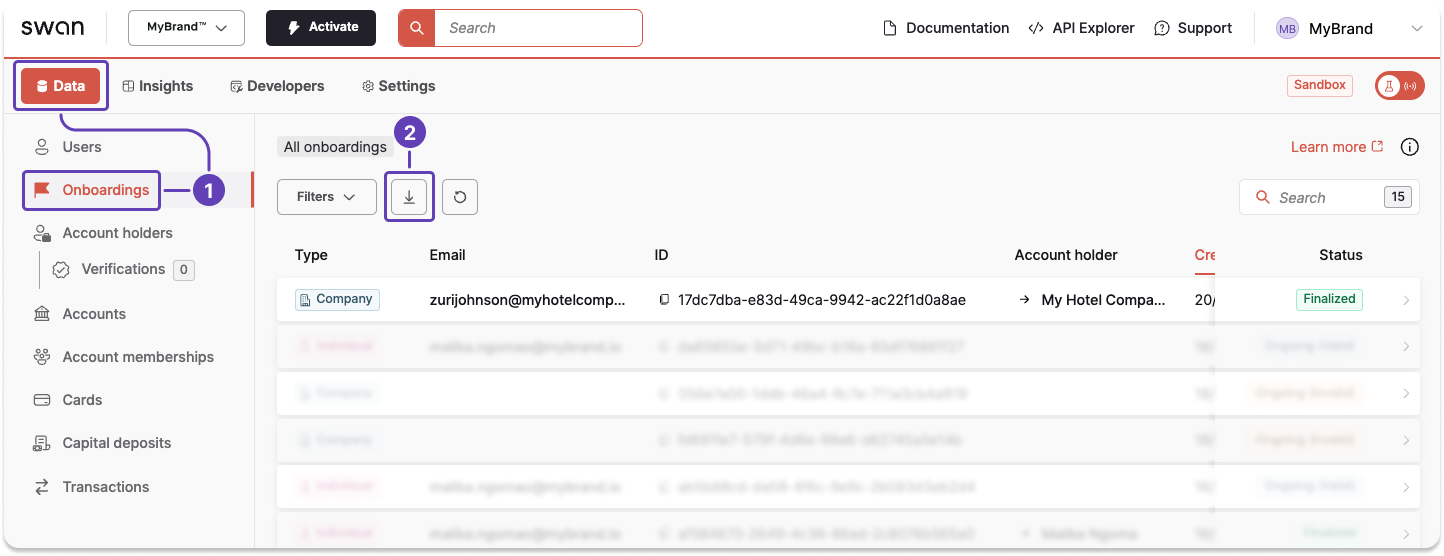
- On your Dashboard, go to Data > Onboardings.
- Click the download icon to trigger a
.csvexport. - A modal appears. Click Export data to finalize the request.
API
- Call the
exportOnboardingDatamutation. - Add your
email. A link to download the.csvexport is sent to the email address you provide. - If required, add filters to your export.
- The following mutation is filtered to
Ongoing (Invalid)Companyonboardings (line 5).
- The following mutation is filtered to
- Add the success payload and rejections.
Mutation
Open in API Explorermutation ExportOnboardings {
exportOnboardingData(
input: {
email: "$YOUR_EMAIL_ADDRESS"
filters: { types: Company, status: Invalid }
}
) {
... on ExportDataSuccessPayload {
__typename
exportId
}
... on MaximumSimultaneousExportsRejection {
__typename
message
}
... on MaximumDailyExportsReachedRejection {
__typename
message
}
}
}
Payload
The payload returns the export ID.
{
  "data": {
    "exportOnboardingData": {
      "__typename": "ExportDataSuccessPayload",
      "exportId": "$EXPORT_ID"
    }
  }
}
Next steps
After you finalize your export, whether from your Dashboard or using the API, a link to download the export is sent to you by email.
You must be logged in to download the .csv export file.
Download links are valid for seven days, after which you need to generate a new export.
Sharing the download link
If you forward someone the email with the download link, they can only use it if they also have access to the Dashboard. Otherwise, an error occurs.
Instead, consider downloading the document and sending it to them.